Saturday, January 5, 2008

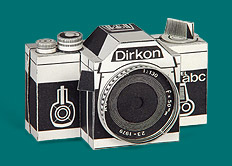
DIRKON – THE PAPER CAMERA


Cut-Out paper pinhole cameras known as the Dirkon, published in 1979 in the (Communist Czechoslovakia) magazine ABC mladých techniků a přírodovědců [An ABC of Young Technicians and Natural Scientists].

Pinhole CZ maintains a website with the instructions for making the Dirkon camera which you can download in Adobe PDF format.

Find it here: http://www.pinhole.cz/en/pinholecameras/dirkon_01.html

If you share this link please let everyone know you found it here at: freephotostuff.blogspot.com

Thanks.

Free Lens Hoods... Part III

You do the math...

Finally thanks to The Great Pyramids, Igor Yefremov, and a little mat
h, we can now easily make our own lens hoods from scratch, on the go and in the field. Read his article How to make a simple lens hood, Recalling ancient pyramids.

One of the most important ways we can go about improving our photographs...

So still not convinced a lens hood is the thing for you? Then you must read Lens Hoods, over at vanwalree.com. It is an expert text on lens flare and the effects of different style hoods to combat it. It is simple to read and has lots of good visuals, don't miss it.

If you share this link please let everyone know you found it here at: freephotostuff.blogspot.com

Thanks.

Free Lens Hoods... Part II

Don't forget to Recycle...

Another great source for lens hoods is found in every day items around the house, namely plastic bottles.


About all it takes is some time and care and careful, slow going to cut the material appropriately and such that it fits properly. In this instance, the 40.5mm diameter of a typical Russky normal lens did not translate out perfectly to the diameter of the plastic bottle, and thus it was necessary to make the cut such that its slightly concave (as seen in the accompanying photo).


When fitted onto the lens, the plastic flexes slightly and exerts a bit more holding pressure than would naturally occur in a straightforward ‘press on’ fitting.


The now finished hood is painted a flat or matte black, and the job is complete. I consider this the “perfect” lens hood for one main reason: it didn’t cost anything but the few minutes work it took to make it.


To really finish it off you could use your PDF printout of a tulip petal-shaped hood to trim the front of the plastic bottle hood.


If you share this link please let everyone know you found it here at: freephotostuff.blogspot.com

Thanks.

Free Lens Hoods... Part I


Printable PDF documents to make your own lens hoods, Calculate your own hood in the field! & Plastic Bottle hoods too!

Lets face it many of us go without lens hoods when in fact they are one of the most important ways we can go about improving our photographs. The purpose of a lens hood is to prevent flare, which can seriously degrade the image quality of photographic lenses. This being said it is often the case that we do not get a lens hood when we purchase the lens, or often in my particular case, the size of the lens hood means it often gets left at home rather than on the camera.

Part I

Cut along the dotted line...

The folks at www.lenshoods.co.uk have completly and utterly obliterated any more lame excuses why the rest of us don't use a lens hood. First off they offer them for free! You hear that Canon & Nikon, and anyone else who charges upwards of $100 for a piece of round plastic. Second they are made from paper so size is no longer an issue, they will simply fold right up. These guys provide hoods in Adobe PDF files for most major manufactures (Canon, Nikon, Olympus, Pentax) and third party lens companies (Sigma, Tamron, Tokina) too. They also provide a service that lets you design your own. These guys even go farther than your manafactur often does, and offer conventional round hoods as well as tulip petal-shaped lens hoods with curved cutout notches. This tulip petal design maximizes the amount of hood coverage for the minimum amount of weight and hood area. Tulip-shaped hoods cannot be used on lenses with rotating ends though, because perfect hoods must be aligned to the sensor frame dimensions.

RegularJen blogged about how she was able to use the PDF lenshoods as templates to cut ones from black art foam: lens hoods on the cheap with bonus conversation.


If you share this link please let everyone know you found it here at: freephotostuff.blogspot.com

Thanks.

Friday, January 4, 2008

Canon's DPP Updated to 3.0.2


Canon's
Digital Photo Professional (DPP)

Free Software to unleash
the RAW power of the EOS Digital SLR


Canon Inc. has just released the latest update to their free RAW processing and workflow software DPP. Version 3.0.2 replaces 3.0.1.5 and includes a major update for Windows Vista and a couple of minor fixes for Mac and non-Vista users.

I generally shoot in RAW format, and I rely heavily on the DPP program. With the release of Version 3 Canon has given its customers a fantastic tool for free. I can often achieve fantastic results processing my RAW images in DPP and never have to adjust them in PhotoShop.

The ability to shoot RAW images is a feature of higher
end cameras and allows for you to have all the raw sensor data from the digital camera without the camera making any automated image enhancements like it would to make a .Jpg image.

This RAW file really is raw data, think of it like a film negative, and must be processed in conversion
software and made into a .Jpg or .tiff file.

This conversion software allows me to make decisions on brightness, tone, contrast, color temperature,
color saturation, and grain sharpness. By allowing me to make these decisions I can fine tune my pictures, often far better than the logic built into the camera.

Canon in addition to providing the RAW software DPP provides a detailed 106
page user manual, and goes one better providing intensive online tutorials that are easy to understand with video examples by world class photographers and Canon reps.

Unfortunately Canon's Digital Photo Professional will only work with RAW files generated by its EOS line of Digital SLR's. For those with RAW files generated by Canon p&s cameras like the G6 or other manufactures RAW files they will sadly not work with DPP.

Canon's DPP software can be downloaded here:
Digital Photo Professional 3.0.2

The DPP manual (106 pages) is here:
support page

Visit the Online learning center for DPP tutorials and video lessons:
DP
P Canon's Digital Photo Professional

If you share this link please let everyone know you found it here at: freephotostuff.blogspot.com

Thanks.


Label Cloud